VKP as reverse proxy
Submitting events
To ease the transition from VKP to JFT, VKP can be configured as a reverse proxy for event submission. Vendors already using VKP can continue without changing their implementation — their events will be forwarded to and handled by JFT automatically.
The figure below shows the information flow when using VKP as a reverse proxy for JFT.
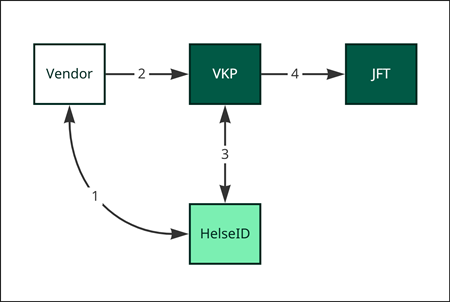
- The vendor acquires an access token for VKP using its existing HelseID client.
- The vendor submits the event to VKP, authenticated with the token from step 1.
- VKP performs a token exchange with HelseID to acquire an access token for JFT.
- VKP forwards the event to JFT, authenticated with the token from step 3.
Note that VKP must be configured on a case-by-case basis (per municipality–vendor combination) for the reverse
proxy to be active. In the Test environment, the synthetic municipality organization number 312229544 is
configured to support VKP Reverse Proxy.
A note on FHIR validation
When implementing this functionality, we found that the VKP FHIR validator is more lenient than the JFT validator in some cases. As a result, some resources that were accepted by VKP were initially rejected when forwarded to JFT. Starting in early March 2026, VKP corrects these structural errors before posting to JFT.
Going forward, vendors are recommended to:
- Avoid changing the resources sent to existing VKP integrations. Structural changes may affect the journal note created by VKP.
- Start testing against Journalføringstjenesten directly, and ensure that FHIR resources sent to the JFT API conform to FHIR R4.
The most common structural errors have been:
- Cardinality: A single object is provided where the field expects an array. Fix: wrap the object in an array.
- Empty strings: An empty string is provided in a
"value"field. Fix: omit the field or provide an actual value.
Retrieving patient-related information
In VKP, vendors commonly retrieve patient-related information as part of the event submission flow. This feature is planned to be handled by a new service (ToBeDefined). In the meantime, VKP can be configured to forward information requests to the EHR on behalf of the vendor. The flow is similar to the event submission proxy described above, with some differences.
The figure below shows the information flow:
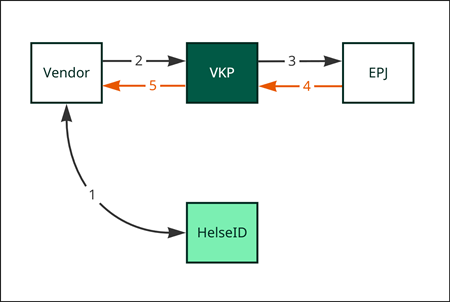
As the figure shows, JFT is not involved in this transaction:
- The vendor acquires an access token for VKP using its existing HelseID client.
- The vendor sends an information request to VKP, authenticated with the token from step 1.
- VKP connects to the EHR and forwards the request as-is.
- The EHR sends the response to VKP.
- VKP forwards the response as-is to the vendor.
As with event submission, VKP must be configured per municipality–vendor combination for this to work.